Introducing the FuckYeah SmartController:
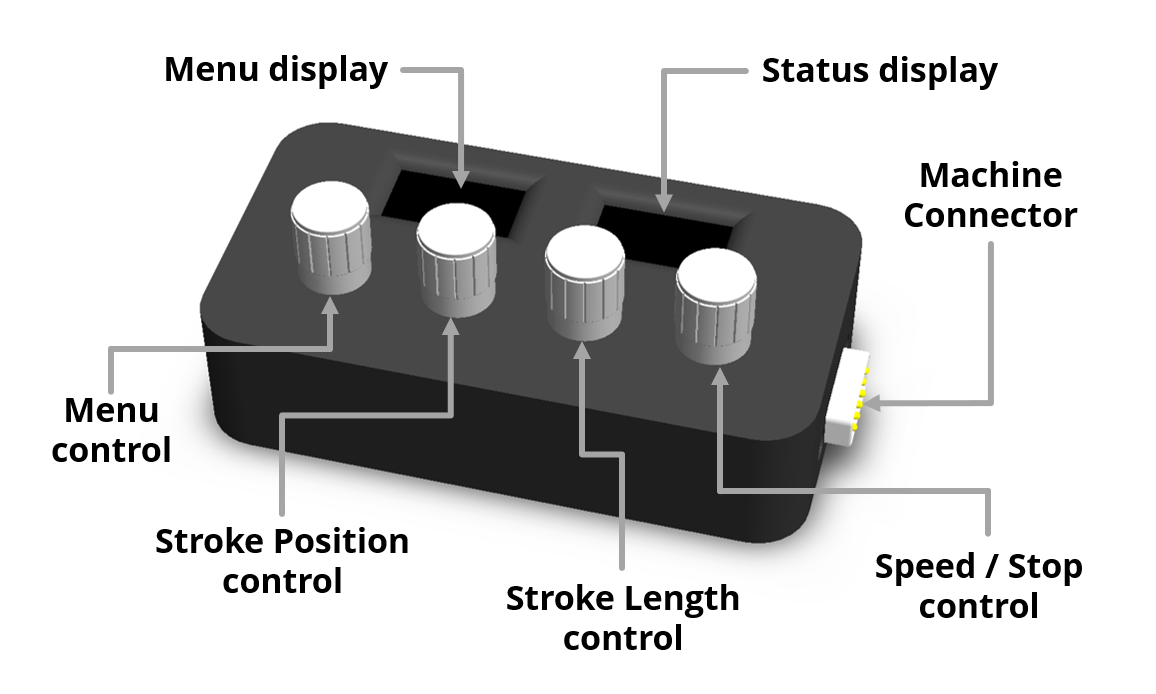
Menu Control & Display
When the machine is idle, the Menu Control is used to navigate the various machine settings menus.
When the machine is active, it can be used to change the movement patterns, Aux Outputs, and enabling or disabling remote control functionality.
Status Display
The Status display shows the current state of the machine, including it's speed, stroke maximum and minimum, and the active movement pattern.
Stroke Position Control
This sets the stroke’s starting position.
Pressing and turning the control while the machine is active will adjust the minimum extension without affecting the maximum extension position.
If the machine is idle, pressing the control will retract it to the start of the configured stroke, holding it down for more than 1 second will fully retract the slide.
Stroke Length Control
This sets the stroke length.
If the machine is idle, pressing the control will extend it to the end of the
configured stroke.
Speed / Stop Control
Turn clockwise to begin fucking, and turn the speed up. Turn anticlockwise to slow it down.
At any point, press this control to stop any movement.
Holding this control down whilst turning it will act as a “jog mode” allowing you to incrementally move the slide in and out.
Machine Connector
Use this connector and the included data cable to connect the SmartController to your machine.
Note: Only use a data cable supplied by FuckYeah. Generic "Serial" or RS232 Cables may appear similar but are not always fully compatible with the FY500.
